ReadyTab - the new tab extension I built myself
Usually I write about tools I discover. This time it is the other way around: ReadyTab is something I created, and I honestly think some of you may want to check it out.
Most posts on this blog are about tools I discovered, tested and wanted to share. This one is different, it's about something I built.
I decided to use this blog for my own projects as well. Partly so someone might find them useful, and partly because it's a motivation thing. Putting a project in writing makes me want to keep working on it, and that alone is nice.
What it is
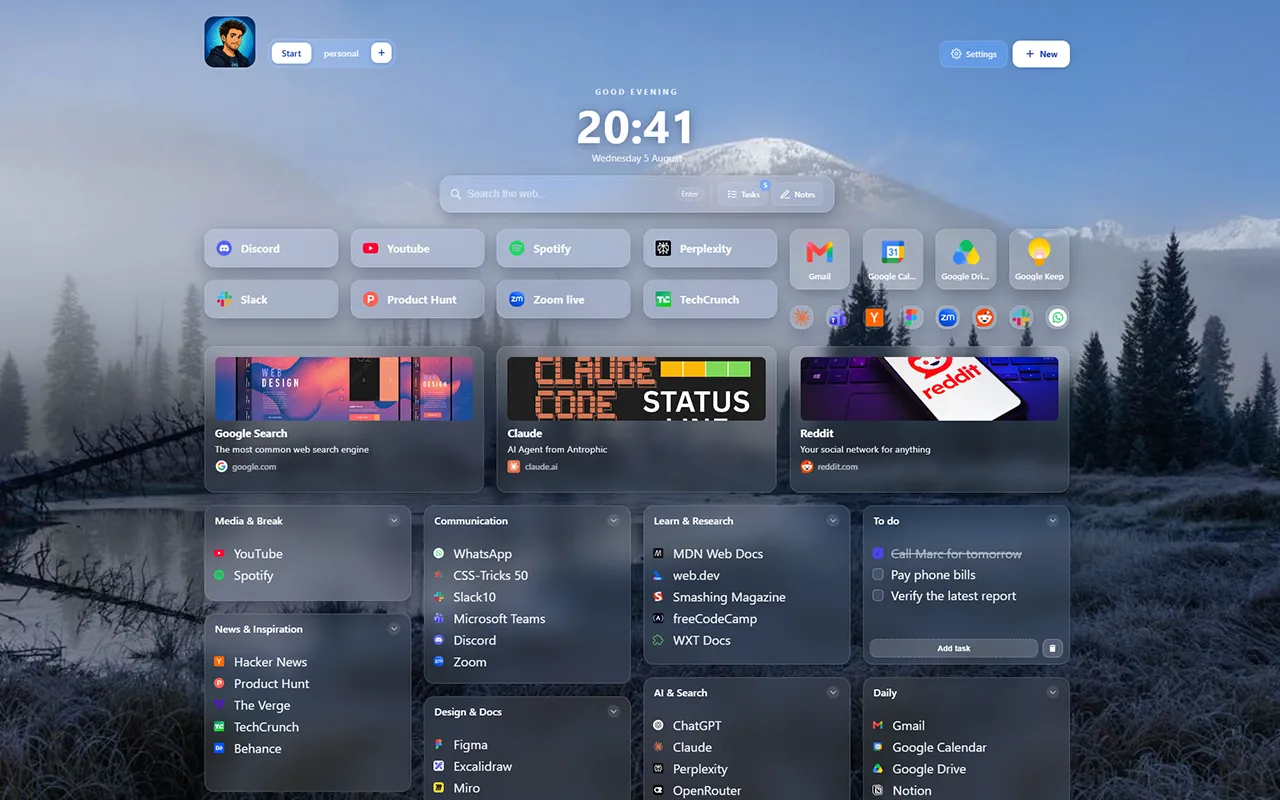
ReadyTab is a browser extension that replaces your new tab page with a dashboard of links, groups and workspaces. Chrome and Firefox are covered, and because it's a standard extension, Edge and Brave work too.
Everything is stored locally by default: no account, no tracking, no ads, and it works fully offline. It's also translated into 10 languages, which still feels a bit unreal to me, but here we are. (Yeah, thanks AI, I won't even try to start to look for another answer for this one.)
My favorite part: the desktop companion
The browser extension is the core, but the best feature is the companion app. It's a small program for Windows, macOS and Linux that talks to the extension over native messaging. It turns your new tab into a real launcher: open a folder, open a file, or run a script or a command straight from your dashboard, without leaving the browser.
My dashboard is more than a list of links anyway. It's the starting point of a project: open a link, jump into a folder, fire a script, all from the same tab. And with the one-click routines I can bundle links, apps, files, folders and clipboard snippets into one button, so my whole work setup opens at once.
Also, this has been my biggest help at work. For each client I have a Kanban Jira board, an Azure repository, Confluence pages, folders, documentation links and so on, and I can navigate much easier now since each one gets its own list of lists. I know I can do the same with bookmarks, but they always end up as a mass grave after some time, so I prefer this: I carefully choose the links I add to the start tab. I don't want to pollute it with stuff I will only open rarely. It's like a mental filter.
What else, quickly
There's a spotlight search across all links, 13 built-in themes plus a full theme editor, public boards you can share as a read-only link (viewers don't even need the extension), and optional cloud sync with version history for Pro. The free tier gives you 2 spaces with unlimited groups and links, and Pro is a one-time or yearly purchase, not subscription heavy.
Why I'm writing this
Maybe it's useful to you. It's free to try, and honestly there's a nice feeling in knowing the thing you built sits in someone's new tab.
If you're curious: readytab.cloud, or install it directly for Chrome or Firefox.
Keep reading