Quick Search - finding entries in Craft CMS in seconds
The Craft control panel search works, but it never felt fast enough to me. Quick Search makes finding any entry, category, asset or user instant, everywhere in the CP.
Third post about my own work: Quick Search, a plugin for the Craft CMS control panel.
What it is
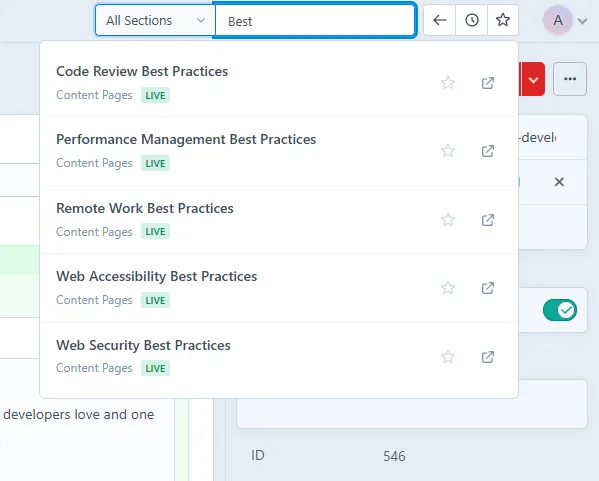
Quick Search puts a fast search everywhere in the Craft CP. Press Ctrl+G for the full-screen overlay, or just click the search field in the header, and start typing. It searches entries, categories, assets, users, globals and even admin elements, and prefixes like u: or a: switch the type on the fly.
Where it beats the built-in search for me: filtering. You can include or exclude sections, pick a site on multi-site setups, and the results update as you type. On a client site with thousands of entries, that turned "click through the tree a few levels" into "type, enter". That's the whole point.
The extras grew from the search: history of what you opened, favorites you can jump to with Alt+1 through Alt+9, saved searches, an outline view for long entries with Matrix blocks, and a related entries panel that shows which entries link to the current one. All keyboard driven, which is my kind of plugin.
It's translated into 20 languages and costs $20 on the plugin store, with a $5 yearly renewal for updates after the first year. composer require yannkost/craft-quick-search, activate it in Settings, done. Or grab it from the Craft Plugin Store, code is on GitHub.
For me this is the plugin that made the control panel feel live again. And yes, same motivation as the other posts around here: building it, shipping it, and writing about it keeps me going. If a client sits in the Craft CP all day, maybe it pays off for you too.
Keep reading