Asset Cleaner - my Craft CMS plugin for unused files
Craft CMS sites collect dead files in their upload folders. I wrote a plugin that finds the unused ones, shows you where the rest is used, and deletes safely.
Continuing the series about my own creations, here's the first of my Craft CMS plugins: Asset Cleaner.
What it is
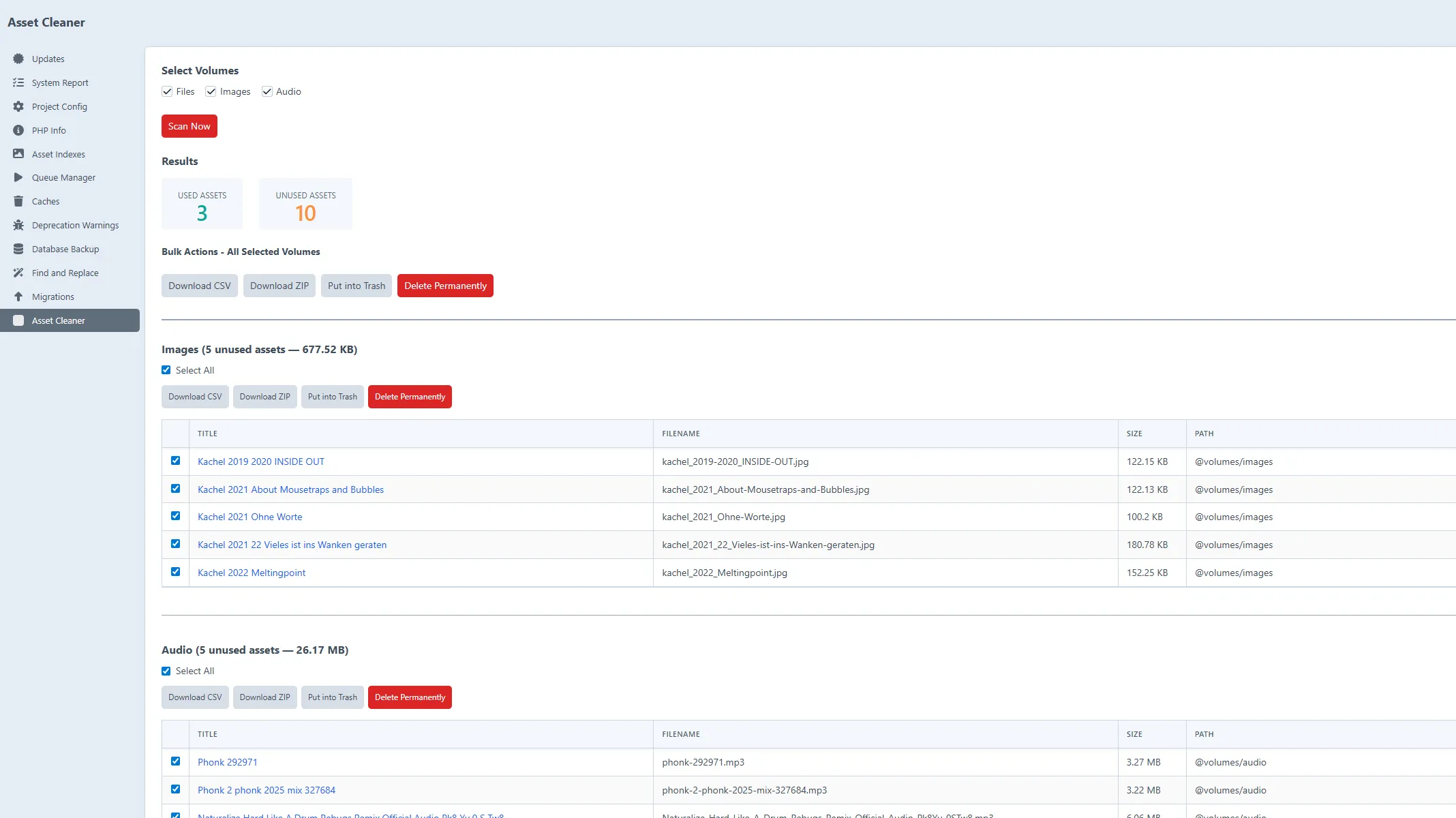
Asset Cleaner is a plugin for Craft CMS 5 that finds the files nobody uses anymore. You install it, go to Utilities, hit scan, and it walks your volumes and tells you which assets aren't referenced anywhere. Results are grouped per volume with file counts and sizes, so you see straight away where the dead weight sits.
The part I'm most careful about is deletion, for obvious reasons. Deletes are soft by default: files go to the Craft trash where you can still recover them, and a permanent delete asks for a double confirmation before anything actually vanishes. I didn't want a tool that deletes files a client might still need, on accident.
There's also an export side: CSV if you want a record, or a ZIP of the unused files, with smart filenames and the choice to keep the folder structure or flatten it. Big files are handled without problems, the ZIP streaming works even with 10GB+ assets without the memory going through the roof.
And if you live in the terminal, the plugin has CLI commands for scanning, exporting and deleting, so you can schedule the whole cleanup with cron if you like.
Why did I build this? Because my own Craft projects accumulated junk that nobody pointed out to me. Craft can show you where an asset is used, but you have to know it might be unused before you bother checking.
The plugin costs $10 on the Craft Plugin Store, plus $5/year if you want to keep getting updates after the first year, which is the usual Craft deal. Code is on GitHub. If you run Craft CMS and your volumes have been growing for years, maybe it helps. And as with all my projects, writing about it keeps me motivated to keep improving it.
Keep reading